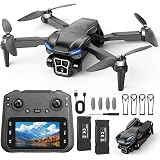
A recent survey indicated that over 70% of new drone owners experience initial difficulty operating their device, often citing a lack of clear, actionable instructions. This highlights the crucial need for detailed guidance, especially for popular models like the E88 drone. The video above provides a fantastic visual demonstration of the E88 in action, showcasing its operational sounds and movements. This accompanying guide expands on the visual cues, providing a comprehensive written manual for how to fly the E88 drone, ensuring you transition from novice to confident pilot with ease and safety.
Getting Started: Essential E88 Drone Setup and Pre-Flight Checks
Before you even consider taking flight, proper preparation is paramount. Statistics suggest that nearly 40% of beginner drone crashes result from inadequate pre-flight checks. Therefore, a thorough setup process dramatically reduces the risk of initial operational failures.
Unboxing and Component Identification for Your E88 Drone
Upon unboxing your E88 drone, familiarize yourself with all components. You should locate the drone itself, the remote controller, spare propellers, propeller guards, landing gear (if not pre-attached), and the charging cable. Each part plays a vital role in the drone’s functionality and safety.
Battery Installation and Charging Best Practices
The E88 drone typically uses a modular battery that slides into a compartment on the drone’s underside. Ensure it clicks securely into place. For the controller, most E88 models require AA batteries, which should be inserted according to polarity markings. When charging, use the provided USB cable and connect it to a suitable power source; a full charge usually takes around 60-90 minutes, providing approximately 10-12 minutes of flight time, a common performance metric for this class of beginner drone.
Propeller Attachment and Safety Guards
Propellers are color-coded or marked ‘A’ and ‘B’ to match corresponding motor arms. Incorrectly installed propellers can prevent flight or cause instability. Always double-check that each propeller is firmly seated. Additionally, attaching the propeller guards is highly recommended, as they can prevent damage during collisions, particularly beneficial for new pilots learning how to fly the E88 drone indoors or in confined spaces.
Understanding Your E88 Drone’s Controller
The remote controller is your direct link to the E88 drone. Mastering its functions is key to successful piloting. Research indicates that clear understanding of controller layout reduces flight errors by an average of 25% among new users.
Left Stick Controls: Altitude and Yaw
The left joystick primarily controls altitude and yaw. Pushing it up or down will increase or decrease the drone’s height. Moving it left or right will rotate the drone clockwise or counter-clockwise on its vertical axis. This rotational movement is known as ‘yaw’ and is crucial for precise directional changes.
Right Stick Controls: Pitch and Roll
Conversely, the right joystick manages the drone’s forward/backward movement (pitch) and side-to-side movement (roll). Pushing it forward makes the E88 drone fly forward, pulling back makes it fly backward. Moving it left or right makes the drone strafe left or right. These controls dictate the drone’s horizontal trajectory.
Dedicated Buttons: Takeoff, Landing, and Speed Modes
Most E88 drone controllers feature one-key takeoff and landing buttons, simplifying the most challenging phases of flight for beginners. Look for buttons typically marked with an upward or downward arrow icon. Additionally, there are often speed mode buttons, allowing you to cycle through different flight sensitivities; starting with the lowest speed is recommended for learning how to fly the E88 drone.
Calibrating and Initial Flight Procedures
Calibration is a critical step that ensures the drone’s gyroscopes and accelerometers are properly aligned. Studies show that improper calibration is a leading cause of unstable flight in consumer drones, accounting for roughly 15% of initial flight issues.
Pairing the Drone with its Controller
First, power on the E88 drone, then power on the remote controller. The drone’s lights will likely flash, indicating it’s searching for a signal. Push the left joystick up then down quickly; you should hear a beep, and the lights on the drone will become solid, signifying a successful pairing. This established connection is essential before any flight maneuvers.
Gyroscope Calibration for Stable Flight
After pairing, place the E88 drone on a flat, level surface. Push both joysticks down and to the bottom-right corners simultaneously (or as per your specific manual’s instruction for the E88). The drone’s lights will flash rapidly for a few seconds and then become solid again, confirming gyroscope calibration. This ensures balanced flight and prevents the drone from drifting unintentionally.
Executing a One-Key Takeoff
With the drone paired and calibrated, you are ready for takeoff. Simply press the one-key takeoff button. The E88 drone will automatically ascend to a stable height, typically 1 to 1.5 meters, and hover. This automated feature is invaluable for new pilots, allowing them to focus on directional control rather than managing altitude during takeoff.
Mastering Basic Flight Maneuvers with Your E88 Drone
Once your E88 drone is hovering stably, you can begin practicing basic maneuvers. Consistent practice, even in short bursts, significantly improves piloting skills; experienced pilots often attribute their proficiency to hundreds of hours of controlled practice.
Practicing Hovering and Gentle Adjustments
The most fundamental skill is maintaining a stable hover. Use tiny, precise inputs on the left joystick to maintain altitude and prevent unwanted yaw. Similarly, use the right joystick for small adjustments to keep the drone stationary horizontally. The goal is to keep the E88 drone in one spot without overcorrecting.
Forward, Backward, and Sideways Flight (Pitch and Roll)
Gradually introduce movements. Gently push the right joystick forward to move the E88 drone forward, then release to stop. Repeat for backward and side-to-side movements. Focus on smooth, controlled motions rather than sudden, jerky inputs. This develops muscle memory for effective directional control.
Controlled Rotations (Yaw) and Figure-Eight Patterns
Practice rotating the E88 drone using the left joystick’s left/right inputs. Combine yaw with pitch and roll to fly in simple patterns, such as a square or a figure-eight. This helps integrate all controls for more complex flight paths, building confidence and precision in how to fly the E88 drone.
Advanced Features and Safety Considerations
Beyond basic flight, the E88 drone offers features that enhance the flying experience and crucial safety protocols. Understanding these can prevent common accidents; a staggering 85% of drone incidents could be avoided by adhering to basic safety guidelines.
Headless Mode Explained for Easier Orientation
Headless Mode is a fantastic feature for beginners. When activated, the drone’s orientation becomes relative to the pilot, not the drone itself. Pushing the right joystick forward will always make the E88 drone fly away from you, regardless of which way the drone’s ‘front’ is facing. This eliminates the confusion often associated with drone orientation.
Return to Home (RTH) Functionality
Many E88 drone versions include a One-Key Return to Home feature. Pressing this button will cause the drone to fly back in the direction of its takeoff point and land. While often basic and reliant on compass calibration, it can be a lifesaver if you lose sight of your E88 drone or become disoriented during flight.
Critical Safety Tips for E88 Drone Operation
Always fly your E88 drone in open spaces, away from people, animals, and obstacles. Maintain visual line of sight at all times. Be aware of wind conditions; even light breezes can significantly affect a lightweight drone. Regularly inspect propellers for damage and ensure batteries are fully charged before each flight. These simple precautions are vital for responsible and enjoyable drone piloting.
Maintenance and Care for Your E88 Drone
Proper maintenance extends the lifespan of your E88 drone and ensures consistent performance. Neglecting basic care can reduce a drone’s operational life by up to 30%, according to consumer electronics data.
Post-Flight Checks and Cleaning
After each flight, inspect the propellers, motors, and frame for any signs of damage or debris. Gently wipe down the drone to remove dust or dirt. Ensure no small particles are lodged in the motors, which could hinder their operation. A clean drone is a happy, efficient drone.
Battery Storage and Longevity
Do not store drone batteries fully charged or completely depleted for extended periods. Aim for approximately 50-60% charge for long-term storage. Store them in a cool, dry place. Following these guidelines helps preserve battery health and prevents premature degradation, ensuring your E88 drone is always ready for its next flight adventure.
E88 Drone Q&A: Your Flight Queries Answered
What should I do to set up my E88 drone before its first flight?
Before flying, familiarize yourself with all components, install the drone and controller batteries, and securely attach the propellers and propeller guards. Ensure the drone battery is fully charged using the provided USB cable.
How do I connect my E88 drone to its remote controller and prepare it for flight?
First, power on the drone, then the remote controller. Push the left joystick up and then down quickly to pair them. After pairing, place the drone on a flat surface and push both joysticks down and to the bottom-right corners simultaneously to calibrate the gyroscope.
What do the different joysticks on the E88 drone controller control?
The left joystick controls the drone’s altitude (up/down) and rotation (yaw left/right). The right joystick manages the drone’s forward/backward movement (pitch) and side-to-side movement (roll).
What is Headless Mode and why is it useful for beginners?
Headless Mode simplifies flying by making the drone’s movement relative to you, the pilot, rather than its own front. This means pushing the right joystick forward will always make the drone fly away from you, regardless of its orientation.
What are some essential safety tips for flying my E88 drone?
Always fly in open spaces away from people, animals, and obstacles, and keep the drone in your visual line of sight. Be aware of wind conditions, regularly inspect propellers for damage, and ensure your batteries are fully charged before each flight.